Maricopa County Jail Inmate Search 2026
Use this guide to search for a Maricopa County jail inmate, check booking number details, view mugshot information when available, confirm bond, understand release status, plan visitation, send money, and check court case information using official links first.
Start here: official Maricopa County inmate search
For current custody information, start with the official Maricopa County Sheriff’s Office inmate information page. Third-party websites may show public records, but they may not show the live jail status, current housing, or updated bond information.
Official MCSO lookup action
Use the official search first. The MCSO form lets users search by booking number or by name and date of birth. After the record opens, check the inmate name, booking number, charges, bond, housing, and current status before taking any next step.
Search with
Booking numberLast nameFirst nameDOB
Jail information line
(602) 876-0322
Use this number for inmate status, bond, charges, visitation, inmate books, and phone questions.
| Need | Official source | Best use |
|---|---|---|
| Current inmate lookup | Maricopa County Sheriff Inmate Information | Search current Maricopa County jail custody and booking information. |
| MCSO main website | Maricopa County Sheriff’s Office | Open the Sheriff website and use Detention / Inmate Information tools. |
| Mugshot lookup | MCSO Mugshot Search | Check booking photo information when available. |
| Jail information phone | (602) 876-0322 | Confirm custody, charges, bond, housing, release, books, phone, or visit questions. |
| Court case lookup | Maricopa County Court Case Information | Check criminal case information, minute entries, hearing dates, and court calendars. |
| Arizona state prison search | Arizona Department of Corrections Inmate Data Search | Use if the person moved from county jail to state prison. |
| Federal inmate lookup | Federal Bureau of Prisons Inmate Locator | Use if the person is in federal custody. |
| Victim / custody alerts | VINElink | Sign up for custody-status alerts where available. |
How to use the official MCSO inmate search
Use the official website as your first step. This keeps you closer to current jail information and avoids outdated third-party records.
- Step 1: Open the official Maricopa County Sheriff inmate search.
- Step 2: Choose the booking number tab if you have the booking number. This is usually the cleanest search.
- Step 3: If you do not have booking number, choose the name and date of birth option.
- Step 4: Enter the last name and first name exactly. Add date of birth when available to avoid wrong matches.
- Step 5: Complete the security check or captcha if the official form asks for it.
- Step 6: Open the matching record and note the booking number, booking date, charges, bond amount, housing location, and status.
- Step 7: Call (602) 876-0322 before visiting, posting bond, sending money, or planning pickup after release.
Maricopa County inmate search screenshot guide
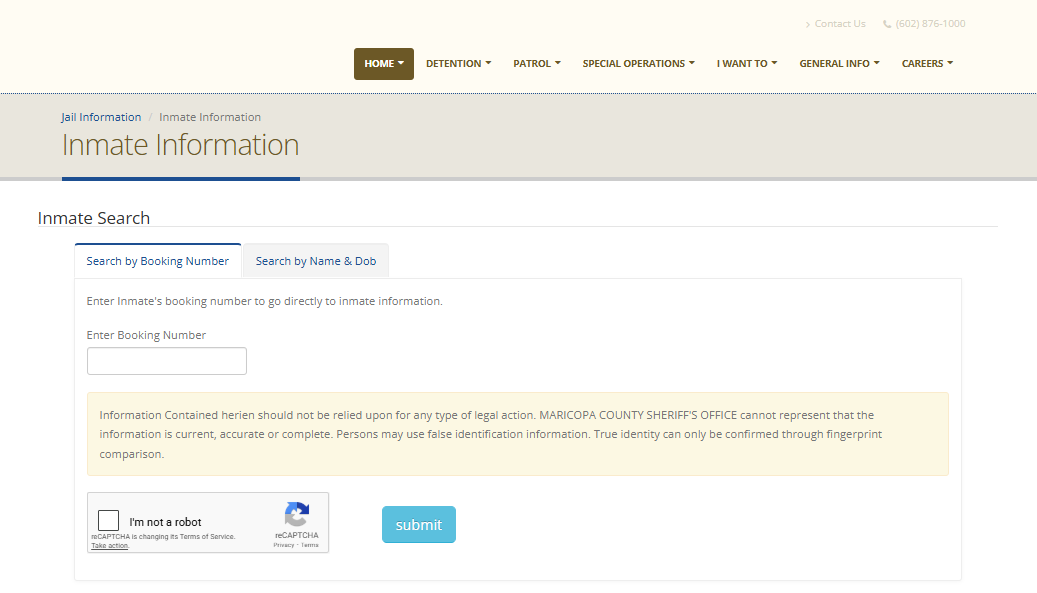
The screenshot below is kept from the original article and shows the official MCSO inmate information search screen. It helps users understand where to enter booking number or name details before opening the official website.
If the inmate is not showing in Maricopa County search
Do not assume the person is not in custody only because the online result is missing. New bookings may take time, names can be entered differently, and some people may be released, transferred, or moved to another jail facility.
Try name variations
Search last name only, full legal name, middle name, hyphen name, maiden name, or common spelling variations.
Use date of birth
Maricopa has many common names. DOB helps avoid opening the wrong person’s record.
Call the hotline
Call (602) 876-0322 if the arrest is very new or the result does not match.
- Step 1: Re-check spelling and search again with only last name and first name.
- Step 2: Add date of birth only after the simple search fails or gives too many results.
- Step 3: Ask the jail if the person is still being booked, released, transferred, or held by another agency.
- Step 4: Check Maricopa County court case search if the person may already have a case number.
- Step 5: Search Arizona DOC or BOP if the person may have moved to state or federal custody.
What Maricopa County jail search results mean
The MCSO inmate search helps with custody and booking information. It is not the same as a court judgment. Charges, bond conditions, and hearing details can change after court review.
| Field | Simple meaning | What to do next |
|---|---|---|
| Booking number | The jail ID number for the person’s current booking. | Save it for phone, bond, money, mail, and jail questions. |
| Booking date | The date and time the person was processed into jail. | If the booking is new, call before visiting or paying. |
| Charges | The listed arrest or case allegations. | Check court records because charges can change. |
| Bond | A possible release amount or condition. | Confirm by phone or court source before payment. |
| Housing location | The jail or unit where the person may be housed. | Confirm before scheduling a visit. |
| Status | Shows active custody, release, transfer, or pending updates. | Call if the status is unclear or urgent. |
Maricopa County mugshot search
Mugshots are booking photos. They may appear in the MCSO record or through the official MCSO mugshot page when available. Use official tools first because public-record copies can be old or removed from context.
- Step 1: Open the official MCSO Mugshot Search.
- Step 2: Search with the name or booking details you found from the inmate search.
- Step 3: Match the result carefully with booking number, DOB, or case details.
- Step 4: If no mugshot appears, use the inmate search first or call the jail information line.
Maricopa County bond and release information
Bond and release status can change quickly after initial appearance, judge review, new holds, or warrant checks. Never pay based only on a third-party page.
1. Find booking
Use MCSO search and write down the booking number.
2. Confirm bond
Call (602) 876-0322 or check court case information.
3. Pay safely
Use only official bond instructions or a licensed local bondsman.
- Step 1: Search the official MCSO inmate page and check if bond is listed.
- Step 2: Open Maricopa Superior Court Criminal Department for court-related criminal case and bond guidance.
- Step 3: Confirm whether the person has a no-bond status, warrant hold, court hold, or another agency hold.
- Step 4: Call the jail information line before paying because release processing can take time.
- Step 5: Keep receipts, confirmation numbers, and the exact booking number.
Maricopa County jail visitation and video visits
Maricopa County has multiple jail facilities, so visiting rules can depend on the inmate’s housing location. Always confirm the current location and visit eligibility before making a trip.
| Visit topic | What to do |
|---|---|
| First step | Use the official MCSO search to confirm the inmate is still in custody and note housing location. |
| Call before visit | Call (602) 876-0322 to confirm visit rules and availability. |
| Video visit | Check the approved visitation provider and facility rules before scheduling. |
| ID requirement | Bring valid government photo ID if an in-person visit is allowed. |
| Arrival tip | Arrive early and expect security checks, wait time, and possible cancellations. |
Before scheduling
Confirm current housing, visit status, video visit option, visitor list rules, and dress code.
Do not bring
Weapons, drugs, recording devices, large bags, or items not allowed by jail security.
How to send money to a Maricopa County inmate
Use official or approved deposit methods only. Always confirm the inmate’s full name, booking number, and current facility before sending money.
- Step 1: Search the inmate on the official MCSO inmate information page.
- Step 2: Write down the booking number and housing facility.
- Step 3: Call (602) 876-0322 and ask for current inmate book / commissary deposit instructions.
- Step 4: Use only the approved online provider, kiosk, or official process given by MCSO.
- Step 5: Keep the receipt until the inmate confirms funds are available.
Maricopa County inmate phone calls
Inmates usually cannot receive direct incoming calls. They may call out through the approved jail phone system, and call rules or providers may differ by facility.
- Step 1: Confirm the inmate’s current housing through MCSO search.
- Step 2: Call (602) 876-0322 and ask for current phone account instructions.
- Step 3: Set up or fund only the approved phone account.
- Step 4: Ask the provider for help if calls are blocked or not connecting.
- Step 5: Remember that jail calls may be recorded and monitored.
Maricopa County inmate mail rules
Mail rules can change by jail facility and inmate status. Use plain mail, include complete inmate details, and never send cash unless the official rules clearly allow a specific process.
Use this basic format
Inmate Full Name + Booking Number
Facility / Jail Name
Official facility mailing address
Full return address from sender
Verify before mailing
Call (602) 876-0322 if you do not know the inmate’s current housing facility or booking number.
| Mail rule | Simple explanation |
|---|---|
| Booking number | Add it when available. Missing booking details can delay or return mail. |
| Return address | Always write your full return address on the envelope. |
| No cash | Do not mail cash, gift cards, or loose valuables. |
| No altered items | Avoid stickers, perfume, glitter, glue, tape, staples, or paper clips. |
| Books / magazines | Follow facility rules. Many jails require books to come from approved sellers or publishers. |
Maricopa County court case lookup after arrest
Jail records and court records are separate. MCSO search helps with custody and booking. The court system helps with criminal case status, hearings, minute entries, and official case information.
Use court search for
Case numberCriminal caseMinute entriesHearing date
Useful court note
The court docket may have update delays. Always confirm time-sensitive hearings with the court or attorney.
- Step 1: Open Maricopa County Public Access to Court Information.
- Step 2: Choose criminal court cases when looking for a felony criminal case.
- Step 3: Search by name, initials and date of birth, or case number when available.
- Step 4: Check hearing date, minute entries, release conditions, attorney information, and case status.
- Step 5: Call court information or contact the attorney if the case result is unclear.
If the person moved to state or federal custody
Maricopa County jail search is for local jail custody. If the person was sentenced, transferred, or taken by another agency, check Arizona state prison search or the federal inmate locator.
Arizona state prison
Use Arizona Department of Corrections inmate data search if the person moved from county jail to state prison.
Federal custody
Use the Federal Bureau of Prisons locator if the person is in federal custody or was transferred to a federal facility.
Maricopa County 4th Avenue Jail map
The 4th Avenue Jail is commonly listed at 201 S. 4th Avenue, Phoenix, AZ 85003. Call before visiting, posting bond, or going to the facility because the inmate may be housed at a different Maricopa County jail.
Before you take action: family checklist
This checklist helps families avoid wrong records, wrong payments, wasted travel, and confusion between jail records and court records.
| Before you… | Do this first |
|---|---|
| Visit a jail | Confirm current custody, housing facility, visit rules, and ID requirements. |
| Post bond | Confirm the current bond amount, court holds, warrant holds, and release conditions. |
| Send money | Confirm inmate full name, booking number, and current housing facility. |
| Send mail | Confirm correct facility address, booking number, and current mail rules. |
| Check court date | Use Maricopa County court case information and court calendar pages. |
Accuracy, privacy, and fairness note
Public jail information can change quickly. A person may be released, transferred, cleared, or have charges changed after court review. This guide is only to help users find official sources and understand the next practical step.
Use official sources
For live custody, bond, release, visit, phone, mail, and court details, always verify with MCSO or Maricopa County court sources.
Presumption of innocence
An arrest, booking record, charge, or mugshot is not a conviction. Guilt is decided by the court.
Use the official Maricopa County Sheriff links above first for current jail custody information. Sponsored public-record tools may show wider arrest, warrant, docket, or background records, but they may not be as current as the official jail roster.
Related inmate search guides
If the person was arrested outside Maricopa County or moved to another county jail, these guides may help you continue your search.
Ventura County Jail Inmate Search · Sacramento County Jail Inmate Search · Placer County Jail Inmate Search · Travis County Jail Inmate Search
FAQs about Maricopa County jail inmate search
How do I search for a Maricopa County jail inmate?
Open the official MCSO inmate information page and search by booking number, name, or name with date of birth when available.
What is the Maricopa County jail information phone number?
The commonly used jail information line is (602) 876-0322. Use it to confirm custody, charges, bond, visitation, inmate books, and phone questions.
Can I search by booking number?
Yes. Booking number is usually the fastest and cleanest search method because it avoids confusion with common names.
Why is an inmate not showing online?
The booking may be new, the name may be spelled differently, the person may be released, or the person may be transferred to another facility.
How do I find a Maricopa County mugshot?
Use the official MCSO mugshot search page or open the inmate record from the official MCSO inmate search when a booking photo is available.
Does a mugshot mean the person is guilty?
No. A mugshot or booking record is not a conviction. A person is presumed innocent unless proven guilty in court.
How do I confirm bond information?
Check the official inmate record and call (602) 876-0322 or check court case information before paying any bond amount.
Can I visit an inmate in Maricopa County Jail?
Visitation depends on facility, housing, schedule, and current jail rules. Confirm by phone before visiting or scheduling video visitation.
How do I send money to a Maricopa County inmate?
First confirm the inmate name, booking number, and current facility. Then use the official or approved deposit method given by MCSO.
Can I call an inmate directly?
No. Inmates usually cannot receive direct incoming calls. They may call out through the approved jail phone system.
How do I check a Maricopa County criminal case?
Use the Maricopa County Public Access to Court Information page and search criminal cases by name, date of birth, or case number.
What if the person moved to state or federal custody?
Use Arizona Department of Corrections inmate data search for state custody or the Federal Bureau of Prisons inmate locator for federal custody.
Last reviewed for official-source flow, screenshot placement, mobile readability, and user-help layout. Always verify live custody, bond, release, visit, phone, mail, money, and court details with official Maricopa County sources.

The Editorial Staff at RadheInfotech LLP manages all content on JailInmateSearch.org. With 15+ years of experience in digital marketing and public records, our team manually verifies every record, link, and update without using AI. We partner with U.S. legal firms to ensure accuracy, privacy compliance, and trustworthy information for users.